Images and Screenshots
Learn how to capture, edit, and describe visual content effectively to ensure clarity, consistency, and accessibility.
These guidelines will help you create professional, user-friendly documentation when working with screenshots, diagrams, and other visuals.
Image guidelines
- Use 100% zoom when capturing screenshots.
- Adjust image dimensions in an image editor.
- Limit image width to 1200 pixels.
- Use consistent image sizes throughout your documentation.
Callouts
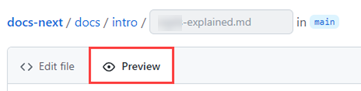
Red box guidelines:
| Property | Specification |
|---|---|
| Shape | Rectangle (avoid circles) |
| Color | #E80808 (Hex) or 232, 8, 8 (RGB) |
| Line width | 3px (use 5px if image width > 960px) |
| Line stroke | Solid |
Alt-text guidelines
-
Start alt-text with image type.
-
"Screenshot of…"
"Screenshot of the Azure Cloud Shell using the PowerShell environment to launch a session and execute the Get-User command."
-
"Diagram showing…"
"Diagram showing a Logic App using the detect-sentiment action to invoke the Text Analytics service."
-
-
For diagrams, focus on describing the key concepts rather than every visual element.
-
For UI and CLI screenshots, include relevant interface elements and specific command details.